Website Development Project: Phases, Roles and Handoff
Plan a website development project from scope and budget to roles, timelines, accessibility checks and a clean client handoff, with practical examples.

You've agreed to get a new website built, and the designer is asking for photos you haven't chosen yet. Someone else controls the domain, your colleague wants a booking system, and nobody's quite sure what “finished” includes.
A website development project needs more than a design and a launch date. It needs agreed deliverables, named decision makers, and a plan for who changes the site after the developer hands it over. Those are the details that keep a modest business website from becoming an open-ended job.
Project Phases, Timelines and Deliverables at a Glance
| Phase | Typical Duration | Main Deliverable | Lead Owner |
|---|---|---|---|
| Discovery and scope | 1-2 weeks | Signed project brief | Project lead with client |
| Content and sitemap | 1-2 weeks | Page list and finished copy | Client content owner |
| Design | 1-3 weeks | Approved page mockups | Designer |
| Build | 2-6 weeks | Working site on a private staging link | Developer or freelancer |
| Review and testing | 1 week | Signed-off list of fixes | Project lead with client |
| Launch and handoff | 1-3 days | Live URL and handoff pack | Developer |
Treat these durations as illustrative planning allowances, not industry averages or a promise for every site. A page containing opening hours is a different job from a booking page that needs to exchange information with another service.
Each phase should end with something the client can approve. The developer shouldn't start building an unapproved layout any more than a builder should frame a house before the plans are signed off.
Discovery settles what the business needs. Content establishes what visitors will read and do. Design arranges that material, and development turns the approved arrangement into working pages. Review, launch, and handoff are separate work, not free extras squeezed into the end.
A dog groomer's working schedule
Say a dog groomer needs home, services, prices, booking, and contact pages. A proposed schedule might allocate a week to discovery, about a week to content, two weeks to design, three weeks to build, a week to review, and two days to launch.
That lands at about eight weeks plus launch, provided approvals arrive promptly. The build occupies only part of the calendar, which often surprises first-time clients.
The booking page needs a decision early. Linking to an existing appointment service is a smaller task than creating custom availability, payments, and cancellation rules. A similar-looking button can conceal very different amounts of work.
Planning rule: Approve the deliverable, not just the time spent. “Design week finished” doesn't mean the design is ready to build.
Where the calendar slips
Late content is a common practical bottleneck. If the groomer hasn't approved prices, the designer can't settle the service cards, and the developer may have to rebuild them later.
For this example, reserve a week of schedule movement when a review round arrives late. That's a proposed project rule, not an unavoidable technical delay: the freelancer may have another client booked into the next available slot.
Before committing, count:
- Pages: Include thank-you pages, policies, and downloadable documents.
- Reviewers: Identify everyone who needs to comment before approval.
- Integrations: List booking, payment, email, and form connections separately.
Then adjust each row. You might propose about five weeks for a simple site with finished content available immediately, or closer to twelve when writing and approvals need more room. Don't shorten testing to compensate for a late start.
Roles That Keep a Website Project Moving
A website project can stall even when everyone is busy. The problem is often unclear ownership: a designer waits for approved copy, a developer waits for a domain decision, and the client is unsure who can sign off. In 2024, 85% of digital agencies built fewer than 25 websites per year for clients, according to Promethean Research's Agency Webdev Trend Report. Ask who owns each responsibility rather than assuming every agency has a separate department for every task.

| Role | What It Owns | Solo Freelancer | Small Agency |
|---|---|---|---|
| Client decision maker | Approves scope, budget and launch | The client | The client |
| Content owner | Supplies final text, photos and files | The client, with an agreed deadline | The client, with agency reminders |
| Project lead | Keeps the schedule and gathers feedback | The freelancer | An account manager |
| Designer | Layouts and visual style | The freelancer | A designer |
| Developer | Builds pages, forms and hosting setup | The freelancer | A developer |
| Tester | Checks pages, documents and keyboard use | The freelancer, self-check | A dedicated QA person or contractor |
Name one approver for each decision, and write that name next to the role in the table.
Solo delivery versus a small agency
A freelancer gives you a direct conversation with the person doing the work. The trade-off is capacity: design revisions, technical fixes and project administration all compete for that person's attention.
In a hypothetical three-person agency, an account manager coordinates a designer and developer, while a contractor may handle testing. This can make coordination clearer, but it also creates a handoff risk: the account manager must pass decisions accurately to the people building the site.
A yoga studio owner who postpones photography can delay a launch by a month. If the owner supplies copy, a freelancer handles design and development, and a friend manages the domain, each responsibility needs a named owner and a delivery date. Otherwise, the team may finish the layouts but still lack the images or access needed to publish.
The project brief should record each person's name, role and sign-off responsibility. A job title alone does not tell the team whose approval is pending. Assign accessibility testing explicitly, too. Give the tester a written list covering pages, documents and keyboard use, then record who confirms the checks are complete.
Setting Scope, Budget and Content Before Build
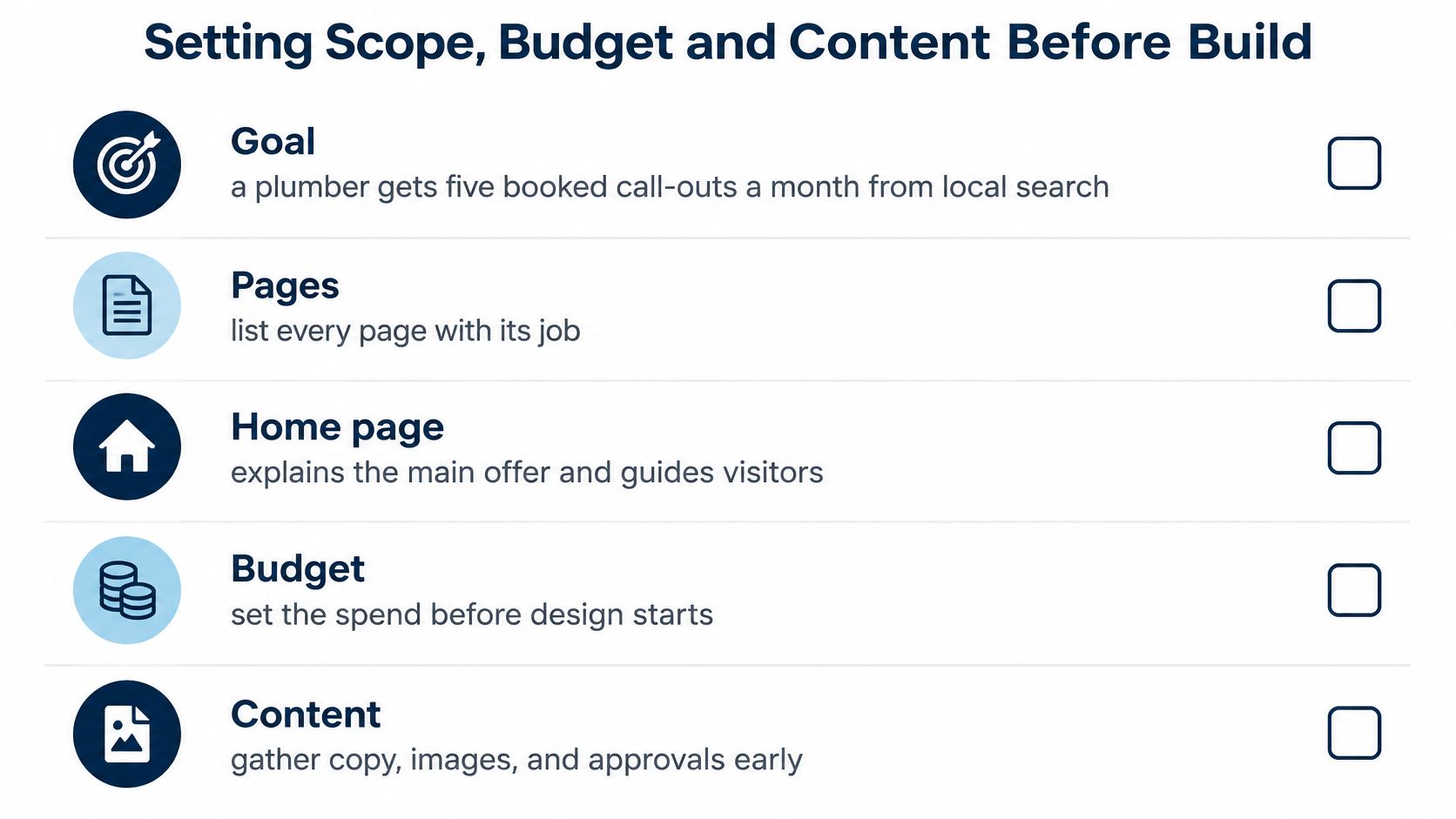
Start with a goal a stranger could check. For example, a plumber might set a target of five booked call-outs a month from local search. That's a hypothetical business objective, not a promised result from publishing a website.
Next, give every page a job. The home page explains the main offer and service area. Service pages answer specific customer questions. The contact page gives visitors a clear way to request a booking.
Use a checklist to settle the practical decisions before paying for finished layouts.
Separate the essential work from later ideas
A plumber needs a reliable enquiry route before an advanced quote calculator. The calculator introduces pricing rules, exceptions, error messages, and testing. Adding it after development starts isn't a small cosmetic revision.
Classify each feature as required for launch or priced separately for later. If something new enters the first category, agree what happens to the fee and delivery date before anyone builds it.
For budget context, GoodFirms' survey of more than 100 web development companies reported that a small-business website typically cost $1,000-$7,000 and required 1-12 weeks of development in 2024. That's a reference range, not a quote for your particular booking requirements.
A brochure-style site with a straightforward booking form could reasonably be discussed around the middle of that range, but custom functionality can change the estimate. Separate initial build costs from hosting, domain renewals, paid integrations, and future edits. Include the hosting pricing page in your budget discussion so recurring costs aren't overlooked.
Put the working agreement in writing
Your brief should include:
- Goal written: State the customer action the site should support.
- Page list agreed: Give every page a purpose and required content.
- Content owner named: Assign dates for copy, photographs, logos, and documents.
- Integrations listed: Identify forms, booking tools, payments, and email destinations.
- Change pricing agreed: Explain how additional work is estimated and authorised.
- Launch approval assigned: Name the approver and proposed launch date.
- Ongoing editing assigned: Identify who updates content and what maintenance includes.
Scope is cheapest to change before build because nobody has to undo completed implementation. Settle these decisions before design begins, including who supplies replacement content after launch.
Performance Targets to Write Into the Brief
Performance is an acceptance requirement, not a finishing touch. A client can approve a beautiful layout without realising that its oversized photographs will make it frustrating to use on a phone.
Google's Core Web Vitals guidance evaluates loading, responsiveness, and visual stability through Largest Contentful Paint, Interaction to Next Paint, and Cumulative Layout Shift. Use those categories to turn “make it fast” into a testable agreement.
Largest Contentful Paint concerns when the main visible content, often a large image or heading, appears. Interaction to Next Paint measures how promptly the page displays feedback after an interaction. Cumulative Layout Shift measures unexpected movement, such as a booking button jumping just as someone taps it.
| Metric | Good Score | Common Cause on Small Sites | Quick Fix |
|---|---|---|---|
| Largest Contentful Paint (LCP) | Google's good classification in field reporting | Oversized hero image | Resize and compress images before upload |
| Interaction to Next Paint (INP) | 200 milliseconds or less | Heavy third-party scripts such as chat widgets | Remove or defer scripts that aren't needed |
| Cumulative Layout Shift (CLS) | Google's good classification in field reporting | Images and embeds without set dimensions | Reserve image sizes and avoid banners that load late |
Agree an asset budget before design
For a hypothetical small-business site, you could propose a hero photograph under 200 KB, a home page under about 1 MB, and no more than two third-party scripts. These are example project limits, not universal requirements. The developer should check whether the agreed design can meet them without making important content unusable.
Keep a long price list available as an accessible download rather than automatically embedding a heavy document. Keep essential prices in ordinary page content so visitors don't need to open a file just to understand the offer.
Consider a wedding photographer with sixty full-size gallery images. An example starting point would be 800-pixel thumbnails that open larger versions on demand, with larger thumbnails where screen size requires them. Visitors can browse without downloading every original photograph.
Don't make every visitor download material that only an interested visitor needs.
Test before and after publication
Use a repeatable lab audit during development to catch heavy resources, blocking scripts, and layout movement. After launch, inspect real-visitor measurements, separating mobile and desktop because the reporting distinguishes them.
The developer should also test slower connections and check the actual entry page, not just an internal page that happens to load quickly. If the site has too little traffic for useful field reporting, keep running controlled checks rather than declaring success without evidence.
Static hosting doesn't guarantee speed. The uploaded images, scripts, fonts, and embeds still determine how much work the visitor's device must do.
Accessibility Tests for Every Page and Document
Name WCAG 2.2 as the accessibility reference in the acceptance criteria. The W3C's WCAG 2.2 guidance identifies its publication as a Recommendation on October 5, 2023, and organises accessibility around content being perceivable, operable, understandable, and reliable.
Choose a conformance target with the developer rather than promising vague “accessibility compliance.” A working form, readable document, and usable menu all belong in the checks.
Run practical checks on real tasks
Give meaningful images useful alternatives. For a café photograph, Flat white and croissant on a marble counter is more informative than IMG_4402. Decorative images should be handled so they don't create unnecessary screen-reader announcements.
Browse without a mouse. Use Tab to move through menus and form fields, then the appropriate keyboard controls to activate them. Try booking a class, not merely reaching the first button.
Keep keyboard focus visible. You should always be able to tell which control is selected. Open and close a mobile menu or dialog and check that focus doesn't disappear behind it.
Check text contrast. Use a contrast checker and set an acceptance target of at least 4.5 to 1 for ordinary body text. Pale grey opening hours on a white background need attention even if they look elegant in a mockup.
Provide an alternative to dragging. If someone can reorder gallery images by dragging, provide move-up and move-down controls too. A visitor shouldn't need a precise dragging gesture to complete the task.
Include downloadable documents
A PDF price list needs real text, a sensible reading order, properly structured headings, and appropriate image alternatives. A scan of a printed price sheet may look correct while giving a screen-reader user little usable information.
Run an automated checker first. Then schedule, for example, a fifteen-minute keyboard-only pass through the main journeys and a phone screen-reader spot check. Treat that time as an initial check, not proof of complete conformance.
- Developer ownership: Record unresolved technical issues and fix them before acceptance.
- Content ownership: Include the image alternative-text list and document source files in the handoff.
- Update ownership: Retest revised pages and replacement files before publication.
Accessibility isn't preserved because the original design passed inspection. A replacement menu image or newly uploaded document can introduce a fresh barrier.
Review Rounds and Feedback Workflow
Set the review schedule before sharing the first preview. For example, the agreement could include two review rounds, with a closing date and three working days for the client to respond to each. These are proposed contract terms; they are not an industry standard.
Give the client a private, working preview to test on their own phone. A static picture cannot reveal a broken booking button or a keyboard trap. Use the client website review workflow to organise feedback around a working address.
Collect decisions rather than scattered messages
Record comments in one shared document so the team can track each request and who raised it.
| Page | Issue | Requester |
|---|---|---|
| Prices | Weekend surcharge is missing | Business owner |
| Contact | Booking confirmation doesn't explain the next step | Reception lead |
| Home | Replace the approved photograph | Business owner |
Ask reviewers to state both the problem and the outcome they want. “The opening hours are hard to find” gives the developer a clear issue to address. “Make it pop” does not.
The client's decision maker should resolve conflicting requests before returning the document. Otherwise, the developer is left to choose between the owner's preference and the receptionist's instruction.
Review boundary: A correction makes the agreed work right. A new feature changes the agreed work.
Close each round explicitly
On Tuesday, a bakery owner sends comments. The freelancer applies the agreed changes by Thursday, and the owner approves the revised page that afternoon. The project lead records that approval in the feedback document. Silence is not approval.
Once a change is approved, replace the files at the same address so the review link stays useful. Ask the client to check the revised page on a phone and with a keyboard before confirming it. This makes the review link part of the handoff, not a message that gets lost in an inbox.
Set out what happens if feedback arrives late. For example, the contract could move the launch date by a week if comments miss the agreed review window.
Freeze content after final approval. New descriptions, replacement photography, and additional pages become priced changes instead of reopening a completed round. Agree who owns the final copy and image files, and who can approve later updates, before the project closes.
Launch and Hand Off the Site
A site can be live while the handoff is still incomplete. Handoff is the transfer of responsibility, including access, renewals, source files, and the ability to make the next change. Static hosting that publishes uploaded files can make a site available quickly, but someone still needs to own the release and its upkeep.
Use this launch sequence before sharing the final address.
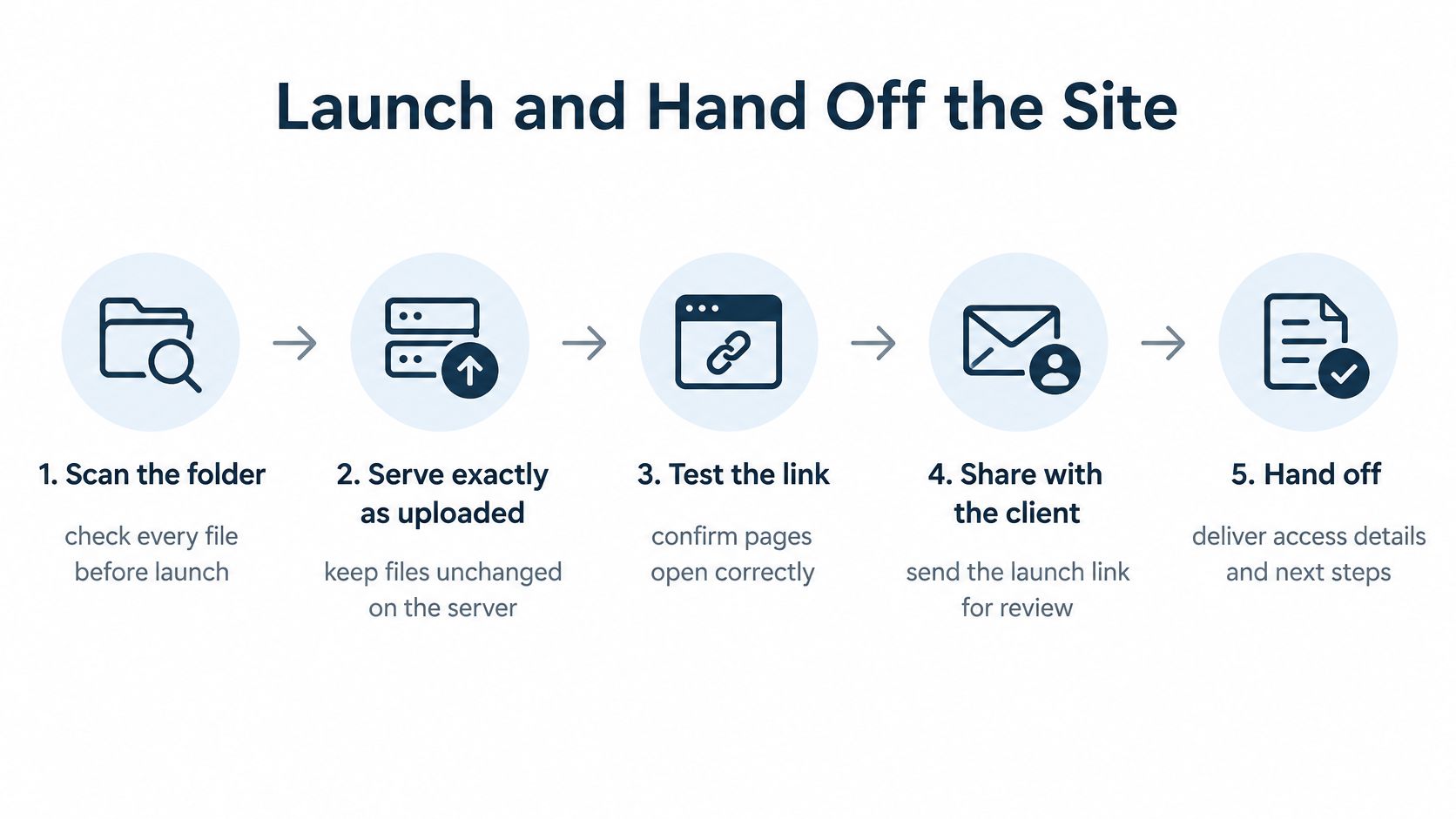
Complete the release checks
Clean and scan the folder. Remove drafts, test files, unused downloads, and material the public shouldn't receive. A safety scan does not determine whether an old proposal belongs in the published folder.
Test the visitor's starting point. Open the site on a laptop and a phone, starting from the address you plan to share. Check navigation, text wrapping, and the path to the main action.
Exercise every action. Click links and downloads, activate buttons, and submit each form. Confirm where responses arrive. A form can look finished while lacking a working delivery service.
Verify HTTPS and redirects. CISA's website security guidance recommends enforcing HTTPS and using HSTS where possible to protect communications in transit. Have the developer confirm the certificate works and redirect old HTTP addresses. If a printed flyer has a QR code pointing to the booking page, test that link securely on phones and computers.
Deliver the handoff pack. Include the live URL, account owner, domain renewal date, source files, alternative-text list, and named content editor. Transfer access securely, rather than putting passwords in the general project document.
Allocate renewal payments. Record who pays for the domain, hosting, and connected services. Make ownership and billing responsibilities clear if the freelancer stops providing maintenance.
Schedule a live-site recheck. Book a phone check after launch and assign someone to fix broken links or failed submissions. Define what counts as correcting a launch defect and what requires additional paid work.
Make the delivery usable
A static site may not support server-side forms or other features that depend on a backend. Check that the chosen hosting setup matches the site's requirements before publication. For finished static files, free static site hosting is one option; the handoff still needs a human owner. Show that person how to find the current source folder and publish an approved replacement.
“Client review sites live on their own domains in minutes. Better than any staging I've built.”
Devon W., Agency lead
Fast publication removes deployment work, not the need for content approval, functional testing, or a clear maintenance agreement. A useful handoff names who can update the site, where the editable files live, and who handles problems after launch.
Confirm the Scope Before You Sign
A signed quote leaves room for disagreement if the client and developer define “finished” differently. Before design starts, make the agreement specific enough that each person knows what to do next without arranging another meeting.
Take these actions this week
Complete the project brief. Record the agreed scope, who supplies and owns the content, acceptance checks, review rounds, and handoff obligations. Mark unresolved decisions so they stay visible until someone resolves them.
Request a clear response. Send the document to the client's decision maker and ask for approval or one consolidated list of changes by a stated deadline. For example, send it Monday and request comments by Friday.
Reserve the launch together. After comments are resolved, put the launch date in both calendars and name the person authorised to approve publication. Record any conditions that must be met before approval.
Confirm who owns updates after handoff, too. Specify who can edit the content, where the source files will live, and whether post-launch changes are included or billed separately. Refer to the stable preview address already agreed for review, rather than creating another link.
If nobody can be named to approve launch, the project is not ready to start. Resolve approval ownership before committing money to design.
Upfling turns finished website folders and files into shareable URLs, with staging and file replacement that keeps the address unchanged. Visit Upfling to publish approved files and share a working preview through handoff.